

有网友在Windows Server 2012R2系统下安装部署金蝶K3 wise14.2,到IIS那步骤竟然报错,提示如下图所示
Note: PkgMgr.exe has been deprecated. Please update your scripts to DISM.exe to install, uninstall, configure, and update features and packages for windows.
see http://go.microsoft.com/fwlink/?LinkID=195329 for more information, operation failed with Ox8007000B
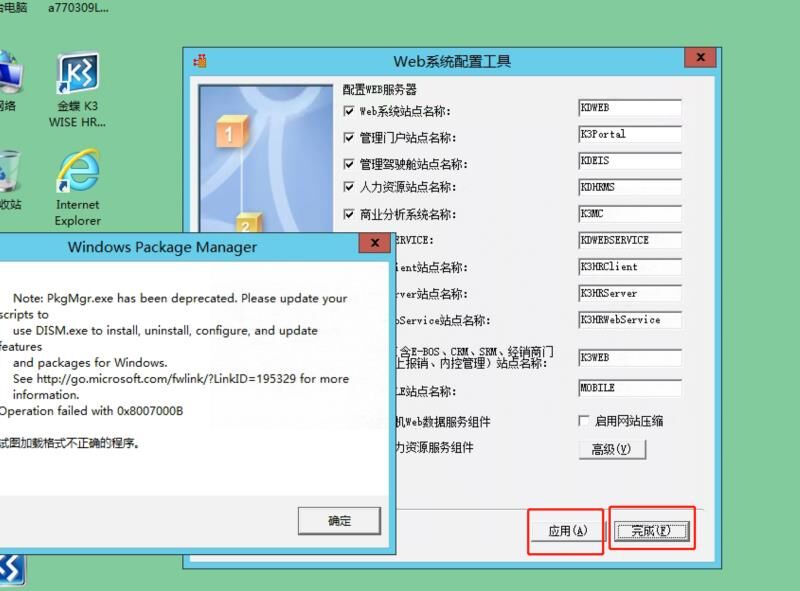
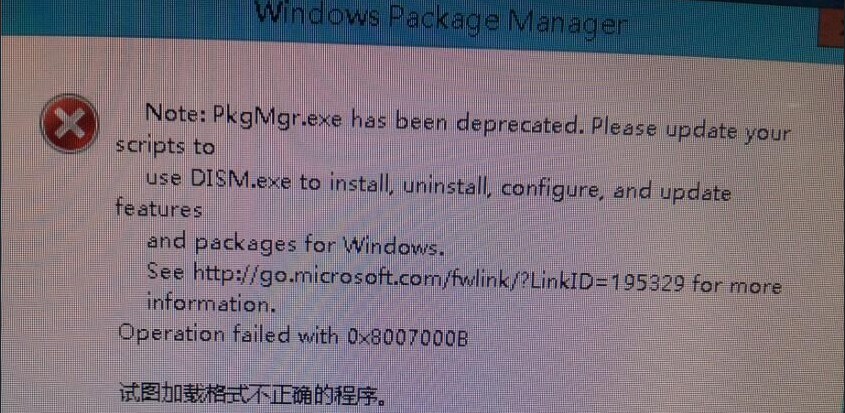
金蝶K3 wise14.2安装到Windows 2012R2报错提示“Note: PkgMgr.exe has been deprecated. operation failed with Ox8007000B”的说明
网友的系统环境:操作系统win2012R2 数据库sql2008 数据库,但是咋操作都是类似的错误!其实出现这样的错误有几种原因,很少有单一方面的,可以多方面查询一下;
1、看下发版说明,是不是 Windows Server 2012R2操作系统过高或过低;
2、精简版ghost系统,精简掉了PkgMgr.exe系统组件或禁用问题;
3、需要使用IIS8.0,Windows Server 2012是IIS8.5过高引起的;
4、VS和IIS安装顺序的问题;
5、.cab更新文件导入时错误;
6、注册对应的asp.net
在cmd 里面执行:C:/Windows/Microsoft.NET/Framework/v2.0.50727/aspnet_regiis -i
正常会是成功的,但是有报错提示失败:
Note pkgmgr.exe has been deprecated please update your scripts to use dism.exe
7、使用 dism.exe
新的windows server 环境可能没有对应的工具
update windows 到最新版本,然后,cmd 里面执行下面语句就可以了
DISM.exe /Online /Cleanup-image /Scanhealth
DISM.exe /Online /Cleanup-image /Restorehealth
更多的问题也可以官方看看:
https://answers.microsoft.com/en-us/windows/forum/all/windows-package-manager-error-message-with/459d7051-a0da-4f0b-a3aa-e91fa36f496b?tab=AllReplies&page=1
BjLaoLiang.Com部分资源来自互联网收集,仅供用于学习和交流,请勿用于商业用途。如有侵权、不妥之处,请联系站长并出示版权证明以便删除。 敬请谅解! 侵权删帖/违法举报/投稿等事物联系邮箱:service@laoliang.net